
Call of Duty: Black Ops 7 is set to release on November 14, 2025, on PC, Xbox, and PlayStation. Depending on your timezone, you may be able to start playing BO7 “earlier” than others. This guide explains how to play Black Ops 7 early using the “New Zealand trick” method. Note: Altering your region can cause unintended issues so proceed at your own risk.
There’s no guarantee that the New Zealand trick will work for everyone; your results may vary.
How to Play Black Ops 7 Early
Those who want early access BO7 can try what’s called the “New Zealand trick” once Black Ops 7 launches in New Zealand. This method involves changing your console or PC’s timezone and/or region so the game appears to have launched in New Zealand, where the release happens earlier. If it works, you’ll be able to download and play the game ahead of your local release time, even though it’s not out in your region yet.
How to Do the BO7 New Zealand Trick
The New Zealand trick for Call of Duty: Black Ops 7 typically works on PlayStation and Xbox. If you’re on PC, it only applies if you’re playing via the Microsoft Store – it will not work on Steam or Battle.net.
While no bans have been reported for using the New Zealand trick to access Call of Duty games early, proceed at your own risk.
Click on a link below to jump to your platform of choice:
PlayStation Black Ops 7 New Zealand Trick
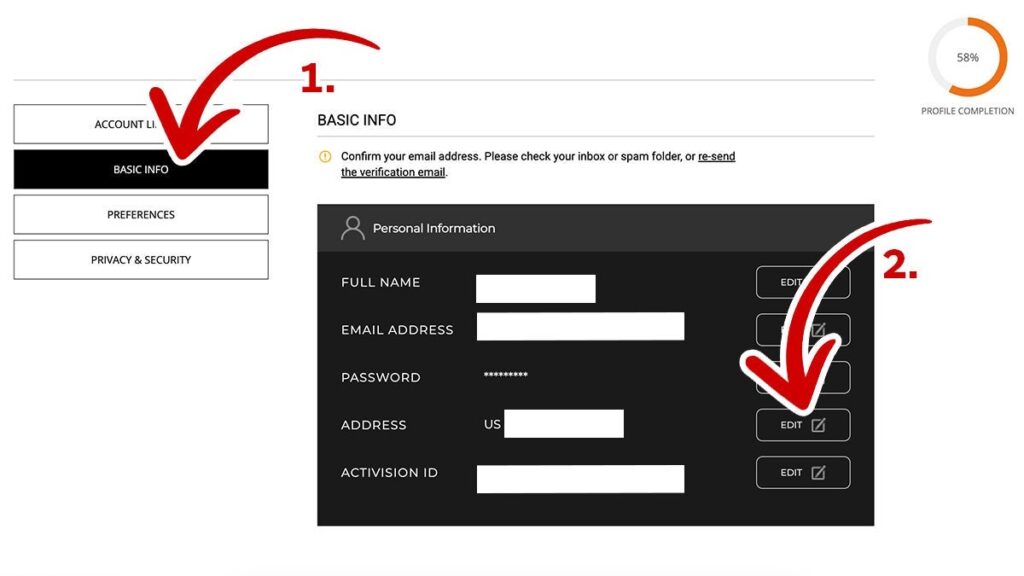
On PlayStation, simply changing your console’s timezone won’t make the BO7 NZ trick work. Instead, you’ll need to change the region on the Activision account linked to your PlayStation. Here’s how:
- Log into your Activision account on the official Activision website (if your PlayStation account isn’t linked, connect it first).
- Tap the blue “PROFILE” button in the top-right corner.
- Select the ‘Basic Info’ tab on the left.
- Click “Edit” next to your address.
- Add a New Zealand address and switch your location to New Zealand using the dropdown.
- Click “Save.”

If successful, you should be able to play Black Ops 7 once it’s live in New Zealand. As with every other method, there is a possibility this won’t work for you.
Xbox Black Ops 7 New Zealand Trick
The Xbox version of the NZ trick works similarly to PlayStation. You’ll need to set your Activision account region to New Zealand, plus an extra step on your Xbox console itself. Some players have had success with this method for past CoD launches, though results can vary, especially for Game Pass users.
- On your PC or mobile device, log into your Activision account on the official Activision website (if your Xbox account isn’t linked, connect it first by clicking the Xbox logo on the login page).
- Click on the blue “PROFILE” button in the top-right corner.
- Select the “Basic Info” tab on the left.
- Click “Edit” next to your address.
- Add a New Zealand address and change your location to New Zealand using the dropdown.
- Click “Save.”
Now, you’ll need to adjust your Xbox settings:
- On your Xbox, open the “Settings” menu from the left sidebar.
- Scroll to “System.”
- Click on “Language & location.”
- Choose New Zealand as your location.
- Click “Restart Now” to reboot your console and apply the changes.
PC BO7 New Zealand Trick
You can’t use the BO7 NZ trick on Steam or Battle.net, but you may possibly be able to do it if you’re playing the Xbox app version. Like on Xbox and PlayStation, you’ll need to change your Activision account region, and you’ll also need to switch your Windows region to New Zealand. Here’s how:
- On your PC, log into your Activision account on the official Activision website.
- Click on the blue “PROFILE” button in the top-right corner.
- Click on the “Basic Info” tab on the left.
- Click “Edit” next to your address.
- Add a New Zealand address and change your location to New Zealand using the dropdown.
- Click “Save.”
- On your PC, open the Start menu and select “Settings.”
- Select “Time & language” in the left sidebar.
- Select “Language & region.”
- Under Region, select New Zealand from the dropdown.
- Restart your PC.
Some players may also need to use a VPN set to New Zealand for the Black Ops 7 NZ trick to work.