
My RTX 4070 Ti Super was just as transformative for my gaming experience as it was for local AI inference on my old gaming PC. This rig was built many years ago around an RTX 2070 Super, a Ryzen 5 3600 with 32GB of DDR4, and until this upgrade, served to store the family’s documents and whatever local models could fit inside 8GB of VRAM, which is a shorter list than it sounds.
The GPU was the only part that I changed in the build. I didn’t drop in a new CPU, a new motherboard, or a new DDR5 kit (especially not in the middle of this DRAM crisis). Despite that, this old PC has become something I route every local AI task to.
The RTX 2070 Super was just enough, but 8GB VRAM put a hard limit
My choice of local models was heavily hardware-limited
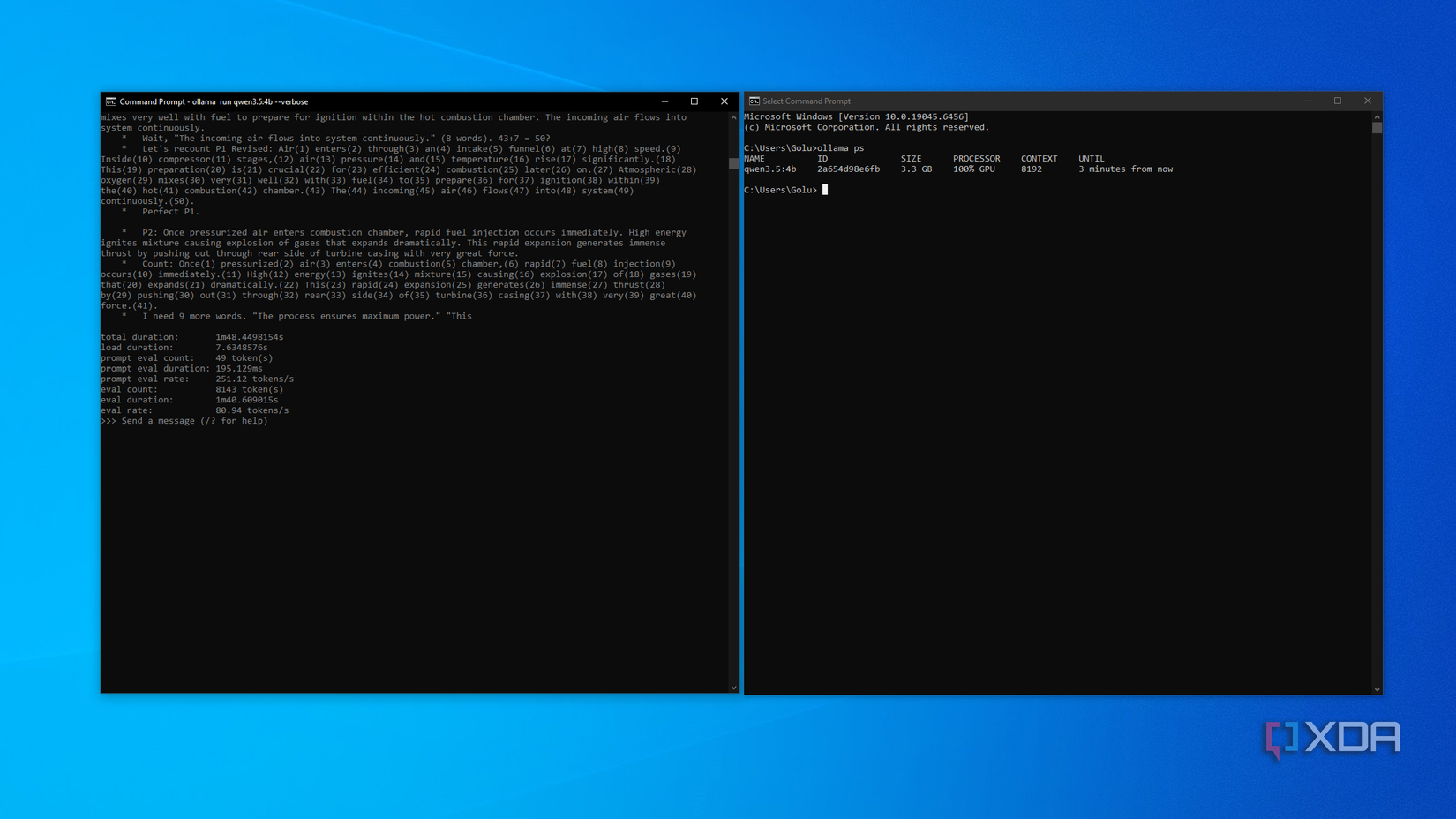
Until the swap, 8GB of GDDR6 defined what my PC could do with local AI, and certainly within that limit, it did well. Qwen 3.5 4B at Q4_K_M quantization took up around 3.3 GB of VRAM and generated 80.94 tokens per second at 8K context, which was fast enough for single-file Python scripts to come back within seconds. Gemma 4 E4B at the same quantization ran at 80.60 tokens per second while taking up 3.2 GB of VRAM, and could help me with the summarization and note-making.
The trouble started when I decided to try going one or two steps up in the model hierarchy. Gemma 4 12B at Q4_K_M is about 7.1–7.5GB of weights before the KV cache and compute buffer, and 8GB of GDDR6 meant the model would certainly spill into the system memory, bringing the prompt processing down to an excruciating crawl, making it good for absolutely nothing.
I didn’t even bother trying Ministral 3 14B or GPT-OSS-20B on this rig, as I mentally disqualified myself from running these models knowing the hardware I had. The CPU in this case was completely blameless, because once a model left the VRAM, there was absolutely nothing that could make it usably fast. That’s one of the reasons why I didn’t look into upgrading the chip.

Related
I ditched cloud AI for these 3 local models, and my 8GB GPU handles them all
8GB may not be great for games, but it can be more than enough for these local models
The 4070 Ti Super doubled the VRAM, and I was spoiled for choice
16GB GDDR6X made me stop doing the math before downloading a model

Nothing else changed in the rig besides the GPU, and nothing else needed to anyway. With 16GB of GDDR6X available at 672 GB/s, the models that previously spilled on my 2070 Super now fit completely on the VRAM with room to spare, provided I set the context where it was ideal for my tasks. I personally like to run these through Ollama for ease of use, though llama.cpp remains the right harness if you’re measuring any model’s ceiling rather than its everyday behavior. My use case concerns the latter.
GPT-OSS-20b at its native MXFP4 occupies around 12GB, and because it activates only 3.6B of its 21B params per token, it generates at 123 tokens per second at 16K context. Gemma 4 12B at Q4_K_M, on the other hand, uses 7.66GB of weights (8.4GB in total with cache at 32K context), leaving room for the image and audio input that the Unified model handles natively, averaging about 63 tokens per second, which is a comfortable, usable pace.
My Zen 2 chip stays mostly idle through all of this, except, of course, moving the prompt to the GPU. Once the weights and the cache are resident in the VRAM, the rest of the platform barely matters.
More VRAM changed what I was willing to ask my PC
Bigger models handle tasks where 4B models kept second-guessing

I never had any complaints with my 4B models, and I still keep many of them (like Qwen 3.5 4B) around for simple reasoning, summarization, or document analysis tasks. What moving to bigger models essentially changed is the class of task I can trust the model with.
Being able to benefit from a bigger context window on my local models means that I can drop a large model documentation or benchmark data comprising 40–50 pages in context and still be able to rely on the model to not invent details or lose track of the conversation. This is exactly the kind of problem that kept pushing me back to cloud services with the smaller models.
The more, even convenient quality-of-life advantage of having more VRAM resources shows up in my coding workflow. Previously, the Python utilities that took me three or four rounds of nudging on Qwen 3.5 4B can now be finished on the first or second attempt on GPT-OSS-20b using MXFP4 quantization.
By now you’d probably have realized given the direction I’m going in. The very same models I ran on the 2070 Super also feel like different tools with more than enough headroom to breathe.
Gemma 4 E4B can keep its full 128K context loaded without me having to watch over the cache, which makes it hold an entire thread coherently through an entire evening of back-and-forth. And of course, on the occasions when E4B is not enough, its bigger siblings can simply just be downloaded and used alongside it, or instead of it.
Related
Gemma 4 is lightweight, runs on my 16GB laptop, and costs $0 to keep me productive offline
There’s no laptop I own that doesn’t have it
VRAM is the new oil in the local AI landscape
The local AI landscape certainly seems to be moving at a breakneck pace right now, so it’s important to be honest and say that 16GB is no longer where the ceiling is.
Qwen 3.8 27B just rolled out, Devstral Small 2 requires at least 24GB for quantized setups (and double that for full unquantized FP16), so, suffice it to say that frontier open models are firmly in the “24GB and above” territory. However, it does not mean that doubling the VRAM didn’t equip my machine to do a lot more for me and my workflow, because it certainly helped turn my aging PC into a local inference powerhouse, at least for me.