
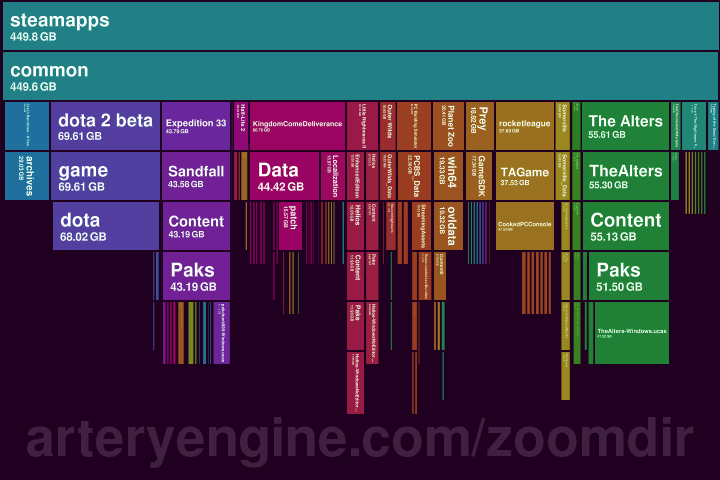
You can download the free app (Win/MacOS) at https://www.arteryengine.com/zoomdir/
(It's an early alpha version so please report any issues.)
Better quality video: https://www.youtube.com/watch?v=fz6hFkU6Mn4
The source of the pictured data is my Steam folder, but that's just an example.
Posted by ViktorChlumsky
28 Comments
Like an improved windirstat. Nice!
It would be funny if it would only work on the steam folder 🙂
Microsoft would explode 20 times over if they tried to make something this practical
This is beautiful. I’m thinking of ways I can replicate this for business application.
Post says early alpha, but website says beta. Which would it be?
Oh neat, fancy windirstat
Pretty cool, like a flashier spacemonger. That exe from 2000 is still putting in work
You might want to take some inspiration from WizTree. They perform some black magic to scan your drive in a few seconds. I think they directly walk the filesystem (MFT) rather than going through OS layers. It does require admin for this, however.
Currently Zoomdir takes quite long to scan through e.g. my docker system folder, as it has a ton of tiny files.
Watch out for virtual links and cloud-style virtual drive.
Like this one:
[https://www.windowslatest.com/2025/11/07/windows-11-phone-link-app-is-losing-photos-feature-android-gallery-moving-to-file-explorer/](https://www.windowslatest.com/2025/11/07/windows-11-phone-link-app-is-losing-photos-feature-android-gallery-moving-to-file-explorer/)
basically folders like “Camera” are links to *.search-ms files that are scripts, in this case retrieving the content of my Camera folder on my phone live.
I will give a try , but I still believe Sequoia View is the best for me 😉
Like space sniffer but with a lot more scrolling
Great effort! Here’s my inputs:
+Pretty, modern-looking & intuitive, also light (1.5 MB)
+Doesn’t need elevated privileges
+Easy to understand which subfolders have a ton of small files *before* clicking them, which was the single biggest annoyance with WinDirStat
+Simple double-click to open any folder/file that might make you go “huh”
=Different visualization than WinDirStat; better for navigating but not better for figuring out “single biggest file / folder” irrespective of hierarchy, which is where WinDirStat’s chunks visualization shines
=Simplified functionality; complete absence of context menu means you can’t screw up something from the application, but you can’t do any deletions and folder-specific refreshes either
-Takes a crap-ton of time to scan tiny files, might consider skipping such files and just assign “X MB” to a chunk called “Small Files”
Reminds me of disk inventory X from back in the day and daisy disk.
Damn. It scans slower than Wiztree. MUCH slower. But the zooming/browsing through the blocks is really cool
Wiztree mapped my NVME C drive within ~10 seconds, this has been running for 1-2 minutes to map it all
Would be good if it can also delete files and structures, to actually get rid of data. Just like Wiztree (or the much older windirstat) allows
cool visual, remind me a bit of wiztree
This reminds me of disk usage utilities on Linux, to be honest.
Could this be published on github? It looks like a lovely application but I have a hard time trusting random people from reddit 😀
Is it open source? Can we see the code?
Super neat! Is this open source? Would be interesting to write plugins to support other storage types, e.g. cloud storage in S3, Google Drive etc.
Any plan to make a Linux build?
qdirstat did it already, and better! Stop reinventing worse wheels…
I wish I could have that as a file explorer, with the addition of little icons for folders and files.
Looks amazing!
Could you tell me how this deals with cloud-synced files? I’m struggling with conventional tools like WizTree and SquirrelDisk as they download all files in my file system when calculating their disk-size. Part of my file system is hosted on my NAS and only gets downloaded when used. This is very convenient usually, however, when I run any of the conventional tools they try calculating the size for every file by first downloading that file locally, resulting in these analyzers only filling up my drive further with files.
Maybe using the tool myself would make it make more sense, but just watching the video on my phone I have no idea how I’m supposed to navigate or read this data in any useful form. Doesn’t jump out at me as “intuitive tool,” just some pretty visualization. Which, I guess fits the sub.
This is the API that [flamegraph](https://www.brendangregg.com/flamegraphs.html) needs – navigating down and up their CPU time stacks is clunky. I know a lot of my colleagues would find that useful
SpaceSniffer is FAR more visually pleasing and is free and can run easily off a USB
What I would really like is a Doom mod where folders are rooms and each file is a demon (.txt is a zombieman, .jpg is an imp, .exe is a hell baron etc.). If you want to delete files you shoot them, and to move files you herd them into another room. Super practical!
so you redid DiskInventoryX/WinDirStat?